
Internal linking for blogs: the complete guide
Internal linking for blogs: anchor text, clusters, click depth, orphan pages and a full audit, so readers and search engines find every page.

Internal linking is the practice of linking from one page of your site to another. It decides how readers move through your blog, how search engines find your posts, and which pages they treat as your most important. It is the cheapest SEO work there is: no budget, no outreach, just better links between pages you already own.
This guide is part of our technical SEO audit series. It covers what a good internal link looks like, how to build clusters around a hub, how to find pages nobody links to, and how to audit the links on a small blog in an afternoon.
What is internal linking? #
Internal linking means adding links from one page on your site to another page on the same site. The links can sit in the body of a post, in menus, in footers or in lists of related posts. They help readers find the next useful page and help search engines discover and understand every page you publish.
Why internal links matter #
Search engines find new pages in two main ways: by following links and by reading your sitemap. Links come first. Google's own guide to making links crawlable says it uses links to find new pages and to understand how pages relate. A post that no other page links to is hard to find, for crawlers and for people.
Internal linking does three jobs at once:
- Discovery. Each link is a path a crawler can follow. More paths to a post means it is found sooner and visited more often.
- Meaning. The words of a link, and the text around it, tell search engines what the target page is about.
- Importance. Pages that many of your own pages link to look more important than pages with one link. Your best guides should collect the most links.
Readers gain just as much from internal linking. A good link answers the question a reader has at that moment: what is this term, how do I do that step, where is the full guide. Each useful link keeps a reader on your site a little longer and moves them closer to the page that matters to your business.
Anchor text: say where the link goes #
Anchor text is the clickable words of a link. It is the strongest clue a reader has about where a link leads, and search engines read it the same way. Good internal linking starts with good link words.
Follow four rules:
- Name the page. "Our guide to XML sitemaps" tells the reader what they will get. "Click here" and "read more" tell them nothing.
- Keep it short. A few words, not a whole sentence. The words around the link can carry the rest.
- Match the target. The link words should describe the page they point to, in terms the reader would use to search for it.
- Vary it. If ten posts link to one guide, they do not all need the same words. Natural variety reads better and gives a fuller picture of the page.
Here is the difference in HTML. Both links point to the same page:
<!-- Vague: the words say nothing about the page -->
click here
<!-- Clear: the words name the page -->
how to set up an XML sitemap
A link must be a real <a> element with an href attribute for search engines to follow it. Links built from buttons or scripts that only work on a click may never be followed. The MDN reference for the anchor element covers the details.
Hub and spoke: build clusters around a pillar #
The most useful shape for internal linking on a small blog is the hub and spoke. One long guide covers a whole subject. This is the pillar page, or hub. Shorter posts each cover one part of the subject in depth. These are the spokes. The hub links to every spoke, and every spoke links back to the hub.
The shape works because it mirrors how readers learn. They land on a spoke from a search, see the bigger picture in the hub, and move on to the next spoke they need. Search engines see a tight group of pages on one subject, all pointing at one guide. Over time this builds Topical authority: the sense that your site covers a subject in full, not by accident.
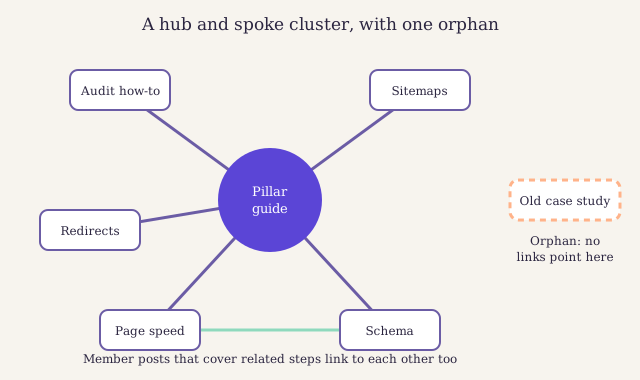
A cluster with one hub and five spokes. Two spokes also link to each other where a reader needs both. The dashed card on the right is an orphan page: it exists, but no link leads to it.
Our own writing series shows the shape. The guide to writing posts that rank is the hub, and every shorter post in the series links back to it. When we planned the cluster, we started from the phrases readers search for, as our guide to keyword research for a small blog explains.
Spokes can link to each other too, but only where a reader would want to move between them. A link from a post on redirects to a post on sitemaps makes sense. A link from every post to every other post does not. It hides the useful links in a crowd.
Place links where readers need them #
Placement is the part of internal linking most writers skip. Where a link sits changes how often it is used and how much it says. A link in the body of a post, inside the sentence that needs it, is the most useful link there is. Links in menus and footers help with discovery, but they appear on every page, so they say little about any one page.
Put the important links early. A reader who needs a term explained needs the link at the first mention, not in a list at the end. Put a link to the hub in the first two paragraphs of every spoke, as this guide does. Then add a short block of further reading near the end for the reader who finished and wants more.
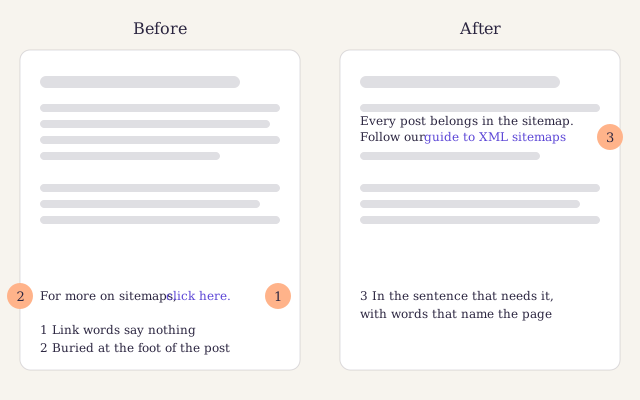
Before: the link hides at the foot and says "click here". After: the link sits in the sentence where the reader needs it, and its words name the page. Same target, far more use.
How many internal links a post needs #
No count is right for every post. In internal linking, the reader sets the number. A post needs as many links as a reader needs, and no more. A short news post may need two. A long guide like this one needs many more, because it touches many subjects with their own pages.
A few working rules keep the count sensible:
- Every post links to its hub. No exceptions.
- Every post gets at least two links in. One from its hub and one from a related post. A post with a single link in hangs by a thread: remove that link and the post is cut off.
- Link a term once. The first mention gets the link. Linking the same page five times in one post adds clutter and nothing else.
- Leave out links that help no one. If you would not click it yourself, cut it.
Khalid's linter checks these for you. It flags a post that no other post links to, a post with only one link in, and a post more than three clicks from the home page. The feature tour shows each check on a real page.
Click depth: keep every post close to home #
Click depth is the number of clicks it takes to reach a page from the home page, following links. The home page is at depth zero. A post linked from the home page is at depth one. A post you can only reach through an archive page, then page three of the archive, then a category, sits much deeper.
Deep pages are found later and visited less, by crawlers and by readers. On a blog the usual cause is the date archive. New posts sit near the top, and older posts sink a page further each time you publish. After a year, your best guide from last spring may be six clicks deep.
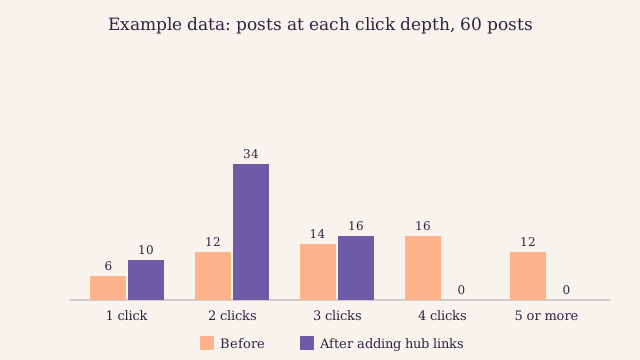
Example data for a small blog. Before, many posts sat four or more clicks deep, reached only through old archive pages. After the team linked every post from a hub and every hub from the menu, no post was more than three clicks away.
The fix for click depth is structure, not more archive pages. Good internal linking keeps every post close:
- Link your hubs from the menu or the home page. Each hub is then one click away, and every spoke two clicks.
- Link new posts to old ones. A fresh post on the home page passes a short path to every older post it links to.
- Add category and tag pages that list every post. They give each post a second path in.
Orphan pages and how to find them #
An orphan page is a page that no other page on your site links to. It may still be in your sitemap, so search engines can know it exists, but nothing on the site leads to it. Readers will never find it by browsing, and search engines treat it as unimportant.
Orphan pages appear in quiet ways: a post dropped from a menu, a campaign page that was never linked, a post whose only link in was removed in an edit. A blog with no plan for internal linking gathers them with every year.
Finding them is the quickest win in internal linking. You compare two lists:
- Every page you publish. Export it from your blog engine, or take the addresses from your XML sitemap. Our guide to setting up a sitemap that search engines trust shows where to find it.
- Every page a crawl reaches by following links. Run a site crawler from your home page, with sitemaps switched off, and export the addresses it found.
Any page on the first list but not the second is an orphan. With both lists saved as plain text, one address per line, a shell does the comparison:
# Clean both lists: one address per line, sorted, no repeats
# Show pages you publish that no link reaches
The grep flags read the second list as fixed lines to match whole, and print only the lines that do not match. If you prefer, the comm tool from GNU coreutils does the same job on sorted lists. The GNU manual for comm explains the columns it prints.
Fix what breaks: redirects, nofollow and dead ends #
Links decay as a site changes. This part covers the problems an audit finds most often.
Redirects and broken links #
Internal linking needs upkeep, because addresses change. When you change a post's address, you add a redirect from the old address to the new one. That keeps old links and bookmarks working. But your own internal links should not rely on it. Each link that goes through a redirect makes the reader wait for an extra hop and makes crawlers do extra work.
After any change of address, update the links on your own pages to point straight at the new one. Watch for chains, where one redirect leads to another. They build up when a post moves twice. Google's page on redirects and how it treats them explains the kinds of redirect and when to use each.
Broken links are worse. A link to a page that returns "not found" is a dead end for the reader and a wasted visit for the crawler. Fix it by linking to the page that replaced the old one, or remove the link if nothing did.
Also link to the preferred address of each page, its canonical URL. If your site can show a page at two addresses, such as with and without a trailing slash, pick one and use it in every internal link.
Do not use nofollow on internal links #
The rel="nofollow" attribute tells search engines not to follow a link or count it as a vote. It exists for links you do not vouch for, such as paid links or links in comments. Google treats it as a hint, as its guide to qualifying outbound links explains.
In internal linking, nofollow helps nothing. Some sites once added it to steer search engines towards their best pages,[^1] but the link still uses up a place on the page, and you lose the discovery path it offered. If a page should not appear in search, use a Noindex tag on that page. If a link should not exist, remove it.
Small blogs also do not need to worry about crawl budget, the number of pages a search engine is willing to crawl on a site in a given time. It matters for sites with huge numbers of pages. For a blog of a few hundred posts, clear links matter far more.
Internal links compared with external links and backlinks #
The three kinds of link do different jobs, and you control them to different degrees. Internal linking is the one you control in full.
| Internal links | External links | Backlinks | |
|---|---|---|---|
| From and to | Your page to your page | Your page to another site | Another site to your page |
| Who controls it | You, fully | You, fully | The other site |
| Main job | Guide readers and crawlers through your site | Show your sources and help the reader | Bring visitors and signal trust |
| Cost to add | Minutes | Minutes | Weeks of outreach or great content |
| Common mistake | Vague link words and orphan pages | Links to weak or dead sources | Buying them |
Many blogs also add a block of related posts at the end of each post, filled in by the blog engine. Khalid does this from tags and clusters, and lets you pin the posts yourself. Is it worth it?
Pros
- Every new post gets links from older posts without anyone editing them
- Readers who finish a post get a clear next step
- Old posts keep a path in as the archive grows
Cons
- Automatic picks can be loose matches that a reader ignores
- Links at the foot of a post carry less meaning than links in the text
- It is no substitute for links written into the body by an editor
Every audit I run finds the same thing. The best post on the site is three years old, eight clicks deep, and linked from nowhere. Fix that before anything else.
The data backs a regular look at old posts. Updating them, links included, is among the cheapest wins on a blog:
Numbers from 140 small business blogs, free to read.
Audit your internal linking in an afternoon #
-
Crawl the site from the home page
Run a site crawler from your home page with sitemaps switched off. Export every address it reaches, with each page's click depth and its count of links in.
-
Find the orphans
Compare the crawl with the list of every page you publish, using the command above. Link each orphan from its hub and one related post, or merge it into a stronger page.
-
Pull deep pages closer
Sort the crawl by click depth. Any post more than three clicks deep needs a link from a hub or from a page near the home page.
-
Fix redirects and broken links
Filter the crawl for links that return a redirect or a not found error. Point each one straight at the final page, or remove it.
-
Check every spoke links to its hub
Go through each cluster. Every member post should link to its pillar near the top, and the pillar should link to every member.
-
Rewrite vague link words
Search your posts for click here, read more and this post. Replace each one with words that name the page.
-
Write the date of the next audit in the calendar
Six months is a good gap for a small blog. Add a short check of new posts to each monthly review as well.
If you want the bigger picture of what else to check while you are crawling, the technical audit series linked at the top of this guide covers speed, indexing and structured data as well. The free crawlers and reports in our list of no-cost SEO tools are enough for this audit.
Why we do not use link-count formulas
Some tools score each page by a model of how link value flows through a site, and suggest links to raise the score. We find these scores useful for spotting pages with no links at all, and of little use beyond that. A reader does not care about a score. Write the links a reader needs, then check that nothing is orphaned or deep.
Internal linking mistakes we fix most often #
- Click here and read more. Vague link words waste the best clue you can give.
- Links only in the footer. A link in a site-wide footer says little about any one page.
- A hub that links to half its spokes. New posts get written and the hub is never updated. Add every new spoke to its hub on the day you publish.
- Old posts never linked to new ones. When you publish, go back to two or three older posts on the subject and add a link to the new one. Our refresh playbook builds this into every update.
- Links through redirects. They work, but each one costs a hop. Point them at the final address.
- Too many links in one paragraph. When every other phrase is a link, readers stop seeing them. Keep the ones that help.
Internal linking is also part of editing. We check every draft against our editing checklist, which asks for a link to the hub, links in for the new post, and link words that name their target.
Questions about internal linking #
Do internal links help SEO?
Yes. Internal links help search engines find your pages, understand what each one is about and see which pages you treat as most important. They also keep readers moving through your site. They will not rescue a weak page, but they help a good page get found and ranked.
How many internal links should a blog post have?
As many as a reader needs. Every post should link to its hub and to the posts a reader will want next, and it should receive links from at least two other pages. Beyond that, judge each link by whether you would click it yourself, and cut the ones you would not.
Should internal links open in a new tab?
No. Readers expect a link on the same site to open in the same tab, and the back button takes them home again. Opening new tabs breaks that habit and can confuse people who use screen readers. Keep new tabs for the rare case where leaving the page would lose the reader's work.
Can I use the same anchor text for every link to a page?
You can, but you do not need to. Matching words help readers know what to expect, and natural variety reads better across many posts. Use words that name the page in a way that fits each sentence. Avoid vague words like click here, which say nothing about the target.
How do I find orphan pages without a paid tool?
Compare two lists. The first holds every page you publish, from your blog engine or your sitemap. The second holds every page a free crawler reaches by following links from your home page. Any page on the first list but missing from the second is an orphan that needs a link.
Signing up by email is not open on this site.
About the author

Technical SEO lead at Larkspur Studio
Experience Nine years in technical SEO, former web performance engineer
Tomas looks after everything a crawler sees before a reader does: page speed, structured data, sitemaps and redirects. He spent four years making a large online shop load faster before he moved to search. He writes in English and German.
Reviewed by