How to choose SEO tools: a buyer's guide for small teams
Numbers from 140 small business blogs, free to read.

The right SEO tools for a small team are the ones that do the jobs you actually have, faster than you could do them by hand. Most teams buy the other way round. They pick the tool with the longest feature list, use a fifth of it, and pay for the rest every month.
This guide is the hub of our tools series. It shows how we choose SEO tools for our own studio and for clients: list the jobs, start with the free data you already own, trial a paid tool against a scorecard, and keep the kit small. Each step links to a review or comparison when you need more depth.
The jobs SEO tools do for a small team #
Before you look at a single product page, write down what you need done. In our experience a small content team has five jobs, and each needs a different kind of data.
- Rank and click data. Which searches show your pages, where they rank and how many people click.
- Crawling. Finding broken links, redirects, missing titles and pages search engines cannot reach.
- Keyword research. Finding what people search for, roughly how often, and how hard it is to rank.
- Content checks. Readability, structure, and whether a draft covers what a reader needs.
- Link data. Which other sites link to you, and to the pages that rank above you.
Some teams add a sixth: reporting, which means pulling the numbers above into one view for a manager or a client.
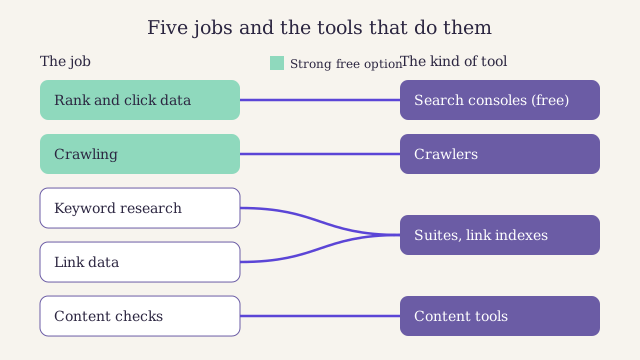
The five jobs and the kind of tool that does each. Notice that rank and click data and basic crawling have strong free options. Most of the money goes on keyword and link data.
The table below is the summary we hand clients. It shows what free tools cover for each job, what a paid tool adds and who usually needs it.
| Job | Free option | What paying adds | Who needs to pay |
|---|---|---|---|
| Rank and click data | Search Console, Bing Webmaster Tools | Daily rank tracking, competitor positions | Teams reporting to clients |
| Crawling | Free tiers of desktop crawlers | Larger crawls, schedules, history | Sites over a few hundred pages |
| Keyword research | Search Console queries, Keyword Planner | Volume and difficulty estimates at scale | Teams planning many new posts |
| Content checks | Readability apps, your own checklist | Topic coverage hints | Teams with many writers |
| Link data | Search Console links report | Links to competitors, link history | Teams doing outreach |
Start with the free first-party data #
First-party data comes from the search engine itself. It is the only data in your kit that counts real searches and real clicks rather than estimating them. All other SEO tools estimate. So before you choose any paid SEO tools, set these two up.
Google Search Console #
Google Search Console is free and shows the searches your pages appeared for, their average position, their clicks and their click-through rate. It also reports indexing problems, page experience and the links Google knows about. Its performance report keeps 16 months of history[^1], which is long enough to compare a season with the same season last year.
Its limits are worth knowing. The web view shows at most a thousand rows per table, so long lists of queries get cut off. Google also hides some rare queries to protect searchers' privacy. For bigger exports, use the API or the bulk export to a data warehouse. Our guide to setting up Search Console the right way covers verification, users and the first reports to read.
Bing Webmaster Tools #
Bing Webmaster Tools is also free. Beyond Bing's own clicks and indexing, it includes a site scan, a keyword research tool and a report of the sites linking to you. You can import your sites from Search Console in a few clicks, so setup takes minutes. For a small team on a budget, its keyword and link reports are a useful free taste of what paid SEO tools do.
We compare the two side by side in Search Console against Bing Webmaster Tools, including the reports only one of them has.
Know the categories of paid SEO tools #
Paid SEO tools fall into a few broad groups. Knowing the groups matters more than knowing brand names, because it tells you what you are actually buying.
- All-in-one suites. Keyword research, rank tracking, site audits and link data in one subscription. Broad, but each part may be shallower than a specialist tool.
- Crawlers. Desktop or cloud tools that fetch every page on your site and list technical faults. Our step-by-step technical SEO audit shows what to do with the output.
- Rank trackers. Tools that check where chosen keywords rank each day, often by city or device.
- Content tools. Readability checkers and content graders that help writers. Our review of Quillmeter, the readability checker we use, shows what a good one does.
- Link indexes. Tools that crawl the web to map who links to whom. They are expensive to run, which is why link data costs the most.
One all-in-one suite
One login, one bill and one place to learn. Good for a generalist team that touches every job a little. You may pay for modules you never open.
A few specialist tools
Deeper on the jobs you do most, and often cheaper in total if you skip link data. More logins to manage, and the data does not join up on its own.
Here is how an all-in-one suite looks from where a small team sits.
Pros
- Covers keyword, rank, audit and link data with one login
- Data from different modules can be compared in one place
- Usually the fastest way to answer a client's ad hoc question
Cons
- The subscription is often the largest line in a small marketing budget
- Seats are often limited, so adding a writer can mean a higher plan
- Breadth can hide weak spots, such as a shallow crawler or thin local data
Part two: decide whether paying is worth it #
When a paid tool pays back, why its numbers differ from other tools, and what to check about privacy and seats.
When paid SEO tools pay back #
The honest test is time. A paid tool earns its place when it saves more hours than it costs, valued at what an hour of your team's time is worth. Features you will not use add nothing to that sum.
Track your hours on the jobs above for one month before you buy. Then estimate the hours the tool would save on each. Here is a worked example with made-up numbers.
Say a two-person team spends nine hours a month pulling rank data into a client report, five hours a month on keyword research in spreadsheets, and four hours checking for broken links by hand. A suite that automates the report, speeds up keyword research and schedules the crawl might save twelve of those eighteen hours. Multiply twelve by your hourly cost. If the result is clearly larger than the subscription, the tool pays back. If it is close, wait.
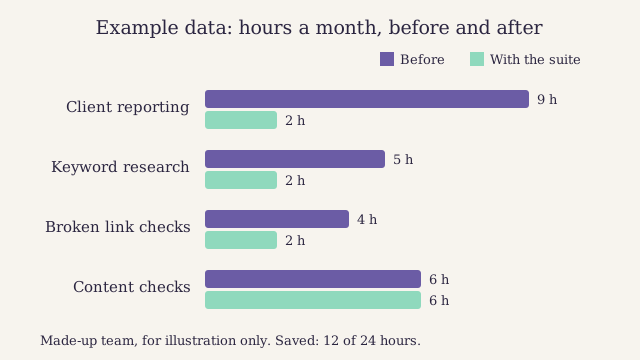
Example data for a made-up two-person team. The biggest saving is on reporting, the job the team liked least. Notice that content checks barely change: no suite writes the post for you.
Why SEO tools disagree with each other #
Put the same keyword into three SEO tools and you will get three different numbers. That is normal, and knowing why stops you from chasing the wrong one.
- Monthly search volume is an estimate. Third-party tools build it from samples of search data and their own models. Treat it as a guide to the size of demand, not a count.
- Keyword difficulty scores are a formula each tool invents. One tool weighs links to the ranking pages, another adds content signals. A score of 40 in one tool says nothing about a score of 40 in another.
- Traffic estimates for other sites multiply estimated volume by an assumed click rate for each position. Errors stack up, so use them to compare, not to forecast.
- Link counts depend on each tool's crawl. No index sees the whole web. A link from another site that one tool shows may be missing from another, and dead links can linger.
The rule we follow: use first-party data for your own site and estimates for everyone else's. Never compare a number from one tool with a number from another.
Privacy, seats and data you keep #
Three questions get skipped in most tool trials and cause trouble later.
Who can log in? Count the people who need access now and in a year. Many SEO tools price by seat or limit seats per plan. Check whether a read-only seat for a client or manager costs extra.
Where does your data go? Connecting SEO tools to Search Console or your analytics gives them your real traffic data. Read what it stores, where, and for how long. If you serve readers in the UK or the EU, check the tool's privacy terms and data processing agreement. The UK Information Commissioner's Office explains what your duties are.
Can you leave? Before you commit, export something: a keyword list, a rank history, a crawl. If the export is poor, every month you stay makes it harder to switch.
Score every tool the same way #
A scorecard stops a trial of SEO tools from turning into a contest of impressions. We score each candidate from one to five on six criteria, weight them for the team's needs, and add up.
| Criterion | What we test | Weight |
|---|---|---|
| Fit to our jobs | Does it do the tasks on our list? | Three |
| Time saved | Hours saved in the trial, against doing it by hand | Three |
| Data quality | Does it match Search Console for our own site? | Two |
| Ease of use | Can a new writer use it without training? | One |
| Seats and sharing | Can everyone who needs it get in? | One |
| Privacy and export | Clear terms, clean exports | One |
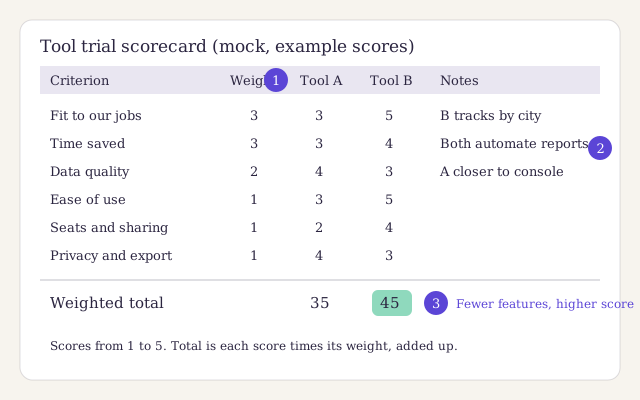
A mock scorecard with example scores for two made-up tools. The first callout marks the weights, the second the notes column, the third the weighted totals. Tool B wins despite fewer features, because it scores higher on the two heaviest criteria.
Why we weight fit and time saved three times as much as ease of use
A tool that is pleasant to use but does not do our jobs is a toy. A tool that saves hours but is awkward still pays back once the team learns it. So the two criteria that decide whether money is well spent carry the most weight. Ease of use matters as a tie-breaker, and it matters more when many occasional users share the tool.
If you keep scorecards in a spreadsheet, this is the header row we start from:
tool,fit_to_jobs,time_saved,data_quality,ease_of_use,seats,privacy_export,weighted_total,notes
Run a two-week trial #
Most paid SEO tools offer a free trial or a cheap first month. Two weeks is enough if you plan it. Without a plan, the trial ends before anyone has used the tool on real work.
-
Write your job list
List the five or six jobs from the start of this guide that you do each month, with the hours each takes today.
-
Pick two candidates
Choose two tools, no more, that claim to cover your heaviest jobs. Start both trials on the same day.
-
Connect your own site
Add your site and connect Search Console where the tool allows it, so you can check its numbers against first-party data.
-
Do real work in week one
Use each tool for the tasks on your list, on live projects. Note the minutes each task takes and anything that confused you.
-
Test the hard parts in week two
Add a teammate, export your data, and ask support one real question. These show the limits a demo hides.
-
Score and decide
Fill in the scorecard, compare the payback with the price, and cancel the trial you did not choose before it renews.
Numbers from 140 small business blogs, free to read.
The kit we use at Larkspur #
We keep our own kit of SEO tools small, and we review every tool on client work before we recommend it. Here is what a typical week runs on.
- Search Console and Bing Webmaster Tools for every client, set up on day one.
- A desktop crawler for audits, with a scheduled cloud crawl on the larger sites.
- One all-in-one suite, shared across the team, mostly for keyword research and client reports.
- Quillmeter for readability while we edit.
- Our own brief kit for planning and editing, which we also sell.
The brief kit holds our brief template, our editing checklist as a printable page, and a simple calendar sheet, in formats that open in any word processor or spreadsheet. It is made for teams of one to five writers.
The same page lists every tool in our kit, with what each one does well and where it falls short. If you are just starting, our roundup of the best free options for small sites covers what to try before you pay for anything.
I judge a tool by the hours it gives back. If I cannot name the job it does each week, we cancel it.
Questions about choosing SEO tools #
Do small teams need paid SEO tools at all?
Not always. A small blog can run well on Search Console, Bing Webmaster Tools, a free crawler and a readability checker. Pay when a job you do every month takes hours by hand and a tool clearly saves more time than it costs. Reporting and keyword research are usually the first jobs worth paying for.
Which is more accurate, a paid tool or Search Console?
For your own site, Search Console. It reports real searches and clicks from Google itself. Paid tools estimate, and their estimates differ from each other. Use paid tools for data Search Console cannot give you, such as other sites' rankings and links, and treat those numbers as estimates.
Should we buy an all-in-one suite or separate tools?
Buy a suite if your team touches every job a little and values one login. Buy specialist tools if most of your hours go on one or two jobs, such as crawling or rank tracking. Score both options on the same scorecard before you decide.
How long should a tool trial last?
Two weeks is enough if you plan the tasks before you start. Use the first week for real work on live projects and the second for the hard parts: adding a teammate, exporting data and asking support a question. Decide before the trial turns into a paid plan.
How often should we review our tool kit?
Once a year, and whenever a renewal comes up. List each tool, the jobs it did in the past year and the hours it saved. Cancel anything nobody opened in the last quarter. Teams change, and the tools that suited last year's work may not suit this year's.
Signing up by email is not open on this site.
About the author

Tools and reviews editor at Larkspur Studio
Experience Seven years running SEO for online shops, tests every tool we review on client sites
Dalia decides which tools Larkspur pays for, and she writes our reviews and buyer's guides. Before she joined the studio she ran search for two online shops, where she learned to judge a tool by the hours it saves, not the features it lists. Nobody pays to appear in her reviews, and she says so when a free tool is good enough.
Reviewed by