



Hreflang is a short tag that tells search engines a page exists in other languages, and where each version lives. Get it right and a reader in Hamburg sees the German post while a reader in Leeds sees the English one. Get it wrong and search engines quietly ignore the lot.
We run this blog in English and German, so we have made most of the hreflang mistakes ourselves. This post shows the tags on our own pages, the rules behind them, and the errors we see most in audits. It belongs to our full technical SEO audit, where language tags are one check among many.
What hreflang tells search engines #
A translated post is a set of language versions: pages that say the same thing to different readers. The tag names every member of that set and its language. Google can then pick the version that suits the person searching, and show it in place of the others.
The glossary entry on language tags has the short version. The details below are from Google's guide to localised versions of your pages, which is the reference we check against.
The rules every set of tags must follow #
Google's rules are few, and each one matters. Break one and the whole set can be dropped.
- Name every version, including the page itself. A page that leaves itself out of its own list is a common slip.
- Return links are required. If page A points to page B, page B must point back to A. Without the return link, Google ignores the pair.
- Use full addresses. Write the whole address with the domain, not a path that starts with a slash.
- Codes follow two standards. The language comes first, as a two-letter ISO 639-1 code. A region can follow, as an ISO 3166-1 Alpha 2 country code, so
deis German andde-ATis German for readers in Austria. - Add a fallback. The value
x-defaultnames the page to show when no version matches the reader's language.
Our own example: one post in two languages #
Our post on Core Web Vitals for writers has a German translation at /khalid/templates/atlas/de/core-web-vitals/. You can browse every German post from our German home page. Both versions of that post carry the same three lines in the head of the page:
The lines are the same on both pages. That is the point: each page names itself, names the other, and names the fallback. Our fallback is English, because a reader whose language we do not cover is more likely to read English than German.
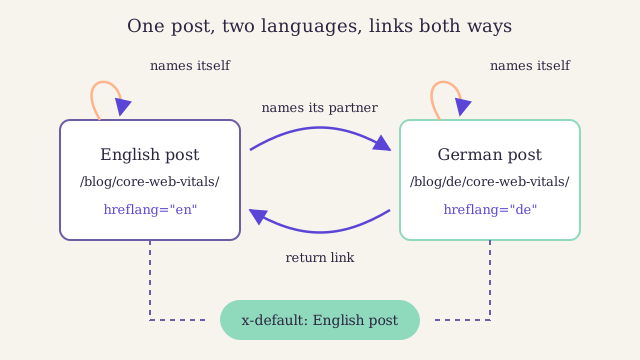
Each page points at itself and at its partner, and both name the English page as the fallback. Notice that the arrows run both ways: remove one and Google can ignore the pair.
Where to put the tags #
Google reads the same information from three places. Pick one and use it everywhere, so you have one list to keep in step.
| Place | Best for | Watch out for |
|---|---|---|
| Link tags in the page head | Most blogs | Every template must print them |
| HTTP headers | Files such as PDFs that have no head | Needs access to the server settings |
| The sitemap | Large sites with many versions | The file grows fast with each language |
If you choose the sitemap route, each address lists its partners inside its own entry. Our guide to what belongs in an XML sitemap covers the rest of that file. We link the sitemap format in the glossary if you need a primer.
Set up hreflang on a two-language blog #
-
List each pair
Make a sheet with one row per post: the English address in one column and its translation in the next. Leave the second cell empty where there is no translation yet.
-
Choose your codes
Use plain language codes, such as
enandde, unless you write different versions for different countries. Most blogs do not need a region. -
Pick the fallback
Choose the version to show readers in other languages. For most blogs that is the original language.
-
Add the tags to both pages
Put the full set on every version, including a line for the page itself and one for the fallback.
-
Check the return links
Open each translated page and confirm it names its partner. A missing return link is the most common reason a set is ignored.
Common hreflang mistakes and their fixes #
| Mistake | What happens | Fix |
|---|---|---|
| The page leaves itself out | The set is incomplete | Add a line for the page itself |
| No return link | Google ignores the pair | Add the tag to the partner page too |
en-UK as a code |
The region code is not valid | Use en-GB |
A region on its own, such as gb |
Read as a language code, not a country | Start with the language: en-GB |
| A canonical tag points to the other language | The two signals clash | Point each page's canonical at itself |
| A tag points to a redirect or an error | That version is dropped | Point it at the final, live address |
The canonical mistake deserves a word. A canonical address tells search engines which page is the real one among copies. A German translation is not a copy of the English post, so each version should name itself as canonical.
What the tags do not do #
Hreflang helps Google choose which version to show. It does not merge the versions, and it does not lift either one up the rankings. A good translation still has to earn its place.
The tags also do not stop Google treating two near-identical pages in the same language as duplicates. If you publish one English post for readers in Britain and one for readers in Ireland, and only the spelling differs, expect one of them to be picked as the main version. Hreflang still helps Google show the right address, but the content itself must differ enough to justify two pages.
Numbers from 140 small business blogs, free to read.